Angelitta Font: Elegant Script for Web Design
I was recently deep in the middle of redesigning a boutique coaching website when I hit that familiar typographic wall. The layout was clean, the color palette was soft and inviting, but the hero section felt sterile. It lacked the personal, human touch that the brand desperately needed to connect with its audience. I cycled through dozens of standard script fonts, but they all felt either too corporate or overly messy. Then I decided to test Angelitta in the main headline. Instantly, the digital space transformed. The typeface brought a level of charm and elegance that balanced perfectly against the modern sans serif body copy, turning a generic landing page into a warm, welcoming digital experience.
As web designers and digital product creators, we know that typography is the voice of a user interface. Finding freebies that actually perform in a professional web environment can be a challenge, but Angelitta stands out as a genuinely useful tool for digital branding. It is not just a decorative afterthought; it is a strategic design asset that adds emotional resonance to headers, banners, and visual content without sacrificing the clean aesthetic required for modern web design.
Elevating Hero Sections and Digital Brand Identity
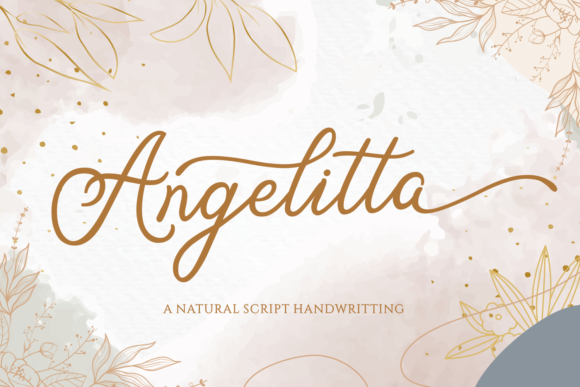
The primary strength of Angelitta lies in its ability to serve as a high-impact display font. In my testing across various viewport sizes, the letterforms maintained their integrity even when scaled up for large hero banners. The strokes are fluid and confident, avoiding the spindly thin lines that often disappear on lower-resolution screens or get lost against busy background images. When used for a main value proposition or a welcome message, this handwritten font creates an immediate sense of intimacy. It signals to the user that there is a real person behind the screen, which is crucial for portfolios, creative agencies, and service-based businesses.
However, using a script font in web design requires intentionality. Angelitta shines brightest when it is given room to breathe. During a recent project for a wedding stationery e-commerce store, I utilized this typeface exclusively for short, emotive phrases like "Celebrate Love" and category titles. By restricting its use to these focal points, the font retained its premium feel. Overusing any decorative typeface can lead to visual fatigue, but treating Angelitta as a special accent ensures it continues to delight users as they scroll. It works exceptionally well overlaid on muted photography or solid pastel backgrounds, where the contrast allows the elegant curves to take center stage.
Responsive Readability and Mobile Considerations
A beautiful font is useless if it breaks the user experience on mobile devices. This is often where free script fonts fail, but Angelitta proved surprisingly resilient during responsive testing. On desktop, the intricate details and swashes add sophistication, but on smaller screens, legibility must take precedence. I found that scaling the font down for mobile views required careful adjustment of line-height and letter-spacing. Because the characters have significant vertical variation due to ascenders and descenders, tight line spacing can cause overlapping issues that frustrate users trying to scan content quickly.
For mobile layouts, I recommend using Angelitta primarily for single-line headlines or very short two-line phrases. Avoid wrapping long sentences in this typeface on narrow screens, as the natural rhythm of the handwriting gets disrupted by awkward line breaks. Additionally, consider accessibility when implementing this font. While it is more legible than many ornate scripts, it should never be used for navigation menus, form labels, button text, or critical instructional copy. Reserve those functional elements for a highly readable sans serif or simple serif font. Angelitta is best deployed as a layer of emotional enhancement rather than a utility for information architecture.
- Hero Headlines: Ideal for 3-6 word statements that set the mood.
- Pull Quotes: Perfect for highlighting testimonials or key insights in blog posts.
- Image Overlays: Maintains weight and clarity over textured backgrounds.
- Logo Text: Strong potential for wordmarks in lifestyle and creative niches.
- Social Media Graphics: Translates seamlessly from web to Instagram or Pinterest templates.
Strategic Font Pairing for Modern Interfaces
The success of Angelitta in a web layout depends heavily on what you pair it with. Because the font itself carries so much personality and organic movement, it demands a grounding partner. In my design system tests, pairing Angelitta with a geometric sans serif created a stunning modern editorial look. The rigid structure of a font like Montserrat or Inter provides the necessary contrast to make the script feel intentional rather than chaotic. This combination works beautifully for course sales pages where you need the warmth of the instructor’s voice (Angelitta) backed by the authority of the curriculum (sans serif).
Alternatively, for brands leaning into a vintage or luxury aesthetic, pairing Angelitta with a classic serif font can evoke a sense of timeless elegance. This approach worked particularly well for a digital brand kit I developed for a high-end skincare line. The serif handled the product descriptions and ingredient lists with clinical precision, while Angelitta added a whisper of luxury to the section dividers and promotional banners. When selecting your secondary typeface, ensure it has enough weight to hold its own. A very light sans serif might get visually overpowered by the darker ink density of the script, creating an unbalanced hierarchy that confuses the scanning eye.
Licensing and Technical Implementation for Web Projects
Before integrating Angelitta into a live site or client deliverable, it is vital to verify the specific licensing terms included with the download. While categorized under freebies, usage rights for commercial web projects, client work, and digital products can vary significantly between font foundries. Always check whether the license covers webfont embedding (@font-face), server-side generation for print-on-demand merchandise, or inclusion in editable digital templates. For professional web designers, ensuring compliance protects both you and your client from future legal complications.
From a technical performance standpoint, consider how you deploy this font. Script fonts can sometimes result in larger file sizes due to complex glyph data. To maintain fast load times and good Core Web Vitals, subset the font if possible, including only the characters and alternates you actually intend to use. Also, explore the OpenType features included with Angelitta. Many versions of this typeface come with contextual alternates and ligatures that automatically adjust letter connections based on neighboring characters. Enabling these features via CSS (font-feature-settings) can dramatically improve the natural flow of the handwriting, preventing disjointed connections that betray the fact that it is a digital font rather than true penmanship.
Ultimately, Angelitta offers a rare combination of accessibility and artistry in the realm of free typography. It respects the constraints of digital design while providing the emotional texture that makes a website feel alive. Whether you are crafting a portfolio, launching an online shop, or designing a campaign landing page, this typeface serves as a reliable bridge between polished professionalism and genuine human connection. Just remember to let it be the star of specific moments rather than the narrator of the entire story, and it will elevate your web designs with effortless grace.